Direct Cloud Access for SaaS on iWAN
When networks are configured with iWAN, there are some use cases such as Compliance, Guest Access, and Direct Cloud Access, which was introduced in iWAN version 2.3.
Compliance
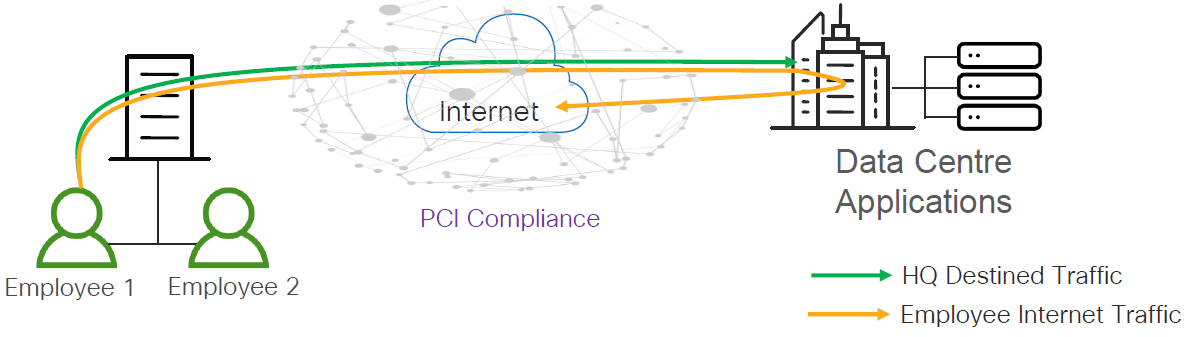
In the case of Compliance, the traffic of a SaaS user at the branch office is backhauled from the branch to the enterprise data center and then accesses a SaaS server close to the data center. This long path usually has high latency, and the traffic also occupies extra network bandwidth at the data center.
This case has the following characteristics:
- Protect against data breaches.
- Protect cardholder data. (In the case of a bank)
- Protect patient data. (In the case of a healthcare environment)
- Transport Security: IPSec VPN.
- Perimeter control and Segmentation: Firewall and Zone-Based Policy Firewall (ZBPF).
Guest Access
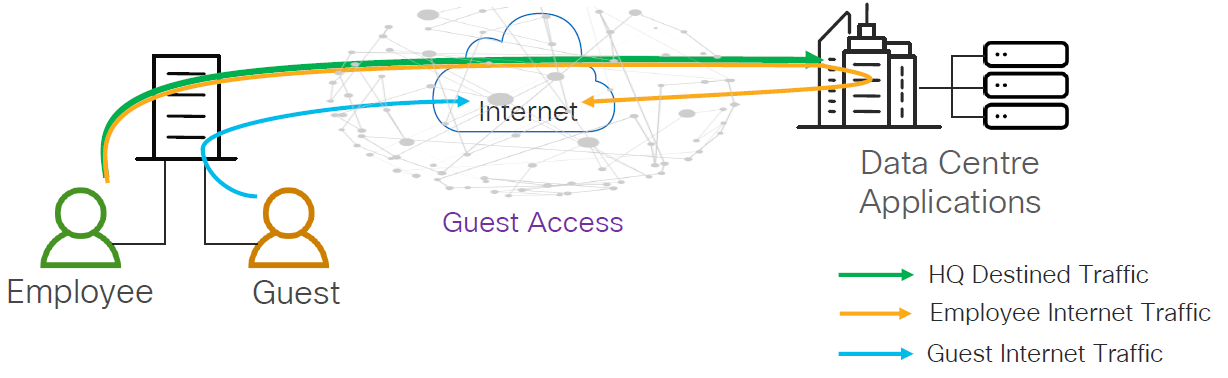
In this case, guest users directly access the Internet for cloud-based applications and web browsing without having to route their traffic through the enterprise data center. This offloads Internet traffic from the WAN by providing isolated and secure direct Internet access for guest users, independent of employee Internet access.
This case has the following characteristics:
- Protect against liability.
- Prevent guest users from disrupting network.
- Perimeter control and Segmentation: Firewall and Zone-Based Policy Firewall (ZBPF).
- Liability Protection: URL Filtering.
Direct Cloud Access
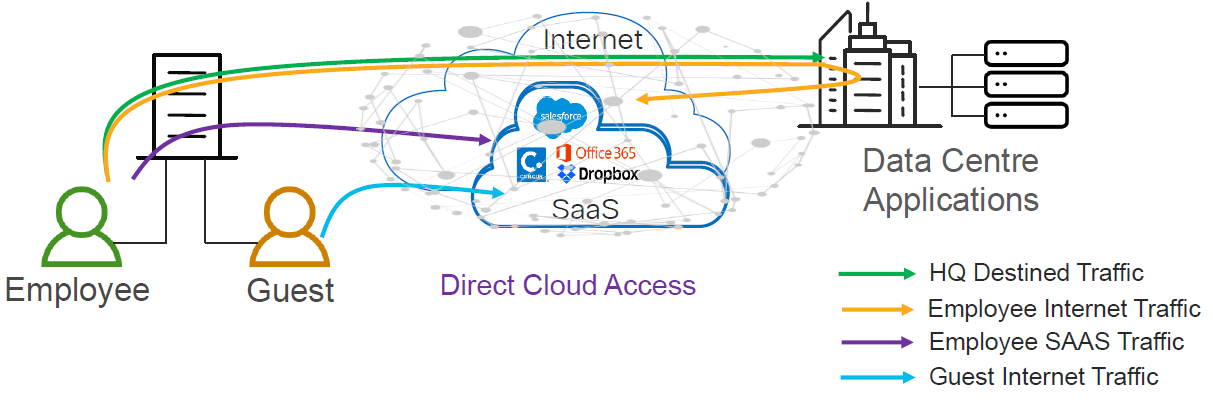
In this case, as more and more traffic shifts to the public cloud — Office 365, Google, AWS, Azure — these SaaS applications require the network to provide good application performance. If not, users may have a bad experience with these applications. The main advantage here is the possibility to break out the SaaS traffic locally and access a SaaS server near the branch, usually with much less latency, which means a better user experience. At the same time, using the PfRv3 configuration, it is possible to continuously monitor the local break out path, as well as the backhaul path and select the best path in the policy, to ensure the best user experience and high availability.
This case has the following characteristics:
- Trusted Cloud Applications.
- Provide better user experience.
- Protect the enterprise branch.
- Perimeter control and Segmentation: Firewall and Zone-Based Policy Firewall (ZBPF).
- Controlled Redirection: Application-Aware Routing.
- Liability Protection: DNS Filtering through Cisco Umbrella.
Since Direct Cloud Access is linked to Umbrella’s DNS Layer Security solution, it is necessary to obtain the API token through Umbrella’s dashboard, which will be used by the branch routers (in this case ISR 4Ks). To achieve location proximity, the SaaS server needs to be close to the branch router for better application performance. Generally, DNS requests for a SaaS application go to an enterprise DNS resolver. However, the DNS request must be changed to a public DNS resolver, such as OpenDNS or Google DNS. The public DNS resolver helps in placing the SaaS server closer to the branch router by using Cisco Umbrella connector.
In this post, I will explain how to configure Direct Cloud Access in a basic way, mapping the SaaS applications associated with Office 365.
Master Controller - Configuration
Using the same PfRv3 policy created on the Master Controller in the previous post, we need to create another class for SaaS Applications with a custom delay threshold of ~500ms for the worst case, since using the local Internet at the branches the delay will always be lower.
!
domain CERC
 vrf default
  master hub
   source-interface Loopback0
   site-prefixes prefix-list DC-PREFIXES
   load-balance advanced
    path-preference INET1 INET2 fallback routing
   enterprise-prefix  prefix-list ENTERPRISE-PREFIXES
   class VOICE sequence 10
    match dscp ef policy voice
    path-preference INET1 fallback INET2
   class VIDEO sequence 20
    match dscp af41 policy real-time-video
    path-preference INET2 fallback INET1
   class LOW_LATENCY sequence 30
    match dscp af21 policy low-latency-data
    path-preference INET1 fallback INET2
   class BULK_DATA sequence 40
    match dscp af11 policy bulk-data
    path-preference INET2 fallback INET1
   class SaaSApplications sequence 50
    match application ms-office-365 policy custom
     priority 1 one-way-delay threshold 500
    match application ms-office-web-apps policy custom
     priority 1 one-way-delay threshold 500
    match application outlook-web-services policy custom
     priority 1 one-way-delay threshold 500
    path-preference DCA1 fallback DCA2 next-fallback routing
!
Branch - Configuration
Using the same PfRv3 and DMVPN configuration from the previous post, it is necessary to configure the following features on the branches:
- DNS resolvers for each VRF.
- NBAR2 considering all the time to use the latest version of the protocol-pack.
- DPI to identify the SaaS Applications.
- The traffic to be ignored using our domain name. If the DNS query that is intercepted by the ISR4K matches one of the configured regular expressions, then the query is bypassed to the specified DNS server without redirecting to Umbrella’s cloud.
- API Token obtained through Umbrella’s dashboard.
- Umbrella’s certificate.
- The domain map in PfRv3, which must match the configuration of the Hub’s Master Controller, where it will work as an IP SLA probe running for all defined domains.
- NAT over each VRF.
!
ip name-server vrf INET1 208.67.222.222
ip domain lookup vrf INET1 source-interface GigabitEthernet0/0/1
ip name-server vrf INET2 208.67.222.222
ip domain lookup vrf INET2 source-interface GigabitEthernet0/1/1
!
ip nbar protocol-pack bootflash:pp-adv-isr4000-169.1-34-47.0.0.pack
!
class-map match-any umbrella-direct-access
 match protocol ms-office-365
 match protocol ms-office-web-apps
 match protocol outlook-web-service
 match protocol attribute application-family microsoft-office
!
policy-map type umbrella umbrella-direct-access
 class umbrella-direct-access
  direct-cloud-access
!
parameter-map type regex dns_bypass
 pattern *codecerc.com.ve
!
parameter-map type umbrella global
 token XXXXXXXXXXXXXXXXXXXXXXXXXXXXXXXXXXXXX
 no dnscrypt
 udp-timeout 5
 resolver ipv4 208.67.222.222
 local-domain dns_bypass
!
crypto pki trustpool import terminal
-----BEGIN CERTIFICATE-----
MIIElDCCA3ygAwIBAgIQAf2j627KdciIQ4tyS8+8kTANBgkqhkiG9w0BAQsFADBh
MQswCQYDVQQGEwJVUzEVMBMGA1UEChMMRGlnaUNlcnQgSW5jMRkwFwYDVQQLExB3
d3cuZGlnaWNlcnQuY29tMSAwHgYDVQQDExdEaWdpQ2VydCBHbG9iYWwgUm9vdCBD
QTAeFw0xMzAzMDgxMjAwMDBaFw0yMzAzMDgxMjAwMDBaME0xCzAJBgNVBAYTAlVT
MRUwEwYDVQQKEwxEaWdpQ2VydCBJbmMxJzAlBgNVBAMTHkRpZ2lDZXJ0IFNIQTIg
U2VjdXJlIFNlcnZlciBDQTCCASIwDQYJKoZIhvcNAQEBBQADggEPADCCAQoCggEB
ANyuWJBNwcQwFZA1W248ghX1LFy949v/cUP6ZCWA1O4Yok3wZtAKc24RmDYXZK83
nf36QYSvx6+M/hpzTc8zl5CilodTgyu5pnVILR1WN3vaMTIa16yrBvSqXUu3R0bdK
pPDkC55gIDvEwRqFDu1m5K+wgdlTvza/P96rtxcflUxDOg5B6TXvi/TC2rSsd9f
/ld0Uzs1gN2ujkSYs58O09rg1/RrKatEp0tYhG2SS4HD2nOLEpdIkARFdRrdNzGX
kujNVA075ME/OV4uuPNcfhCOhkEAjUVmR7ChZc6gqikJTvOX6+guqw9ypzAO+sf0
/RR3w6RbKFfCs/mC/bdFWJsCAwEAAaOCAVowggFWMBIGA1UdEwEB/wQIMAYBAf8C
AQAwDgYDVR0PAQH/BAQDAgGGMDQGCCsGAQUFBwEBBCgwJjAkBggrBgEFBQcwAYYY
aHR0cDovL29jc3AuZGlnaWNlcnQuY29tMHsGA1UdHwR0MHIwN6A1oDOGMWh0dHA6
Ly9jcmwzLmRpZ2ljZXJ0LmNvbS9EaWdpQ2VydEdsb2JhbFJvb3RDQS5jcmwwN6A1
oDOGMWh0dHA6Ly9jcmw0LmRpZ2ljZXJ0LmNvbS9EaWdpQ2VydEdsb2JhbFJvb3RD
QS5jcmwwPQYDVR0gBDYwNDAyBgRVHSAAMCowKAYIKwYBBQUHAgEWHGh0dHBzOi8v
d3d3LmRpZ2ljZXJ0LmNvbS9DUFMwHQYDVR0OBBYEFA+AYRyCMWHVLyjnjUY4tCzh
xtniMB8GA1UdIwQYMBaAFAPeUDVW0Uy7ZvCj4hsbw5eyPdFVMA0GCSqGSIb3DQEB
CwUAA4IBAQAjPt9L0jFCpbZ+QlwaRMxp0Wi0XUvgBCFsS+JtzLHgl4+mUwnNqipl
5TlPHoOlblyYoiQm5vuh7ZPHLgLGTUq/sELfeNqzqPlt/yGFUzZgTHbO7Djc1lGA
8MXW5dRNJ2Srm8c+cftIl7gzbckTB+6WohsYFfZcTEDts8Ls/3HB40f/1LkAtDdC
2iDJ6m6K7hQGrn2iWZiIqBtvLfTyyRRfJs8sjX7tN8Cp1Tm5gr8ZDOo0rwAhaPit
c+LJMto4JQtV05od8GiG7S5BNO98pVAdvzr508EIDObtHopYJeS4d60tbvVS3bR0
j6tJLp07kzQoH3jOlOrHvdPJbRzeXDLz
-----END CERTIFICATE-----

!
!
domain CERC
 master branch
  domain-map
   application ms-office-365 domain http://www.office.com dscp default
   application ms-office-web-apps domain http://www.office.com dscp default
   application outlook-web-service domain http://www.office.com dscp default
 vrf default
  border
   source-interface Loopback0
   master local
  master branch
   source-interface Loopback0
   site-prefixes prefix-list SITE-PREFIX
   hub 192.168.0.1
!
ip access-list extended ACL-LOCAL
 permit ip 192.168.10.0 0.0.0.255 any
!
route-map NAT permit 10
 match ip address ACL-LOCAL
!
ip route vrf INET1 0.0.0.0 0.0.0.0 85.214.132.1
ip route vrf INET2 0.0.0.0 0.0.0.0 91.184.48.1
!
ip nat inside source route-map NAT interface GigabitEthernet0/0/1 vrf INET1 overload
ip nat inside source route-map NAT interface GigabitEthernet0/1/1 vrf INET2 overload
!
interface GigabitEthernet0/0/0
 ip nat inside
 ip address 192.168.10.1 255.255.255.0
 umbrella in direct-cloud-access umbrella-direct-access LANB10
!
interface GigabitEthernet0/0/1
 vrf forwarding INET1
 ip nat outside
 ip nbar protocol-discovery
 ip address 85.214.132.2 255.255.255.252
 domain path DCA1 direct-cloud-access
 umbrella out
!
interface GigabitEthernet0/1/1
 vrf forwarding INET2
 ip nat outside
 ip nbar protocol-discovery
 ip address 91.184.48.2 255.255.255.252
 domain path DCA2 direct-cloud-access
 umbrella out
!
Branch - Verifying DCA
Once the branch is configured to identify SaaS applications and Umbrella is set up, we can verify it with the following commands:
Branch_10# show umbrella deviceid
Device registration details
Interface Name          Tag              Status          Device-id
Gi0/0/0                 LANB10           200 SUCCESS     010a3d458c172b8b

Branch_10# show umbrella deviceid detailed
Device registration details

 1.GigabitEthernet0/0/0
      Tag               : LANB10
      Device-id         : 010a3d458c172b8b
      Description       : Device Id recieved successfully
      WAN interface     : GigabitEthernet0/0/1
      WAN VRF used      : INET1


Branch_10# show umbrella config
Umbrella Configuration
========================
   Token: XXXXXXXXXXXXXXXXXXXXXXXXXXXXXXXXXXXXX
   OrganizationID: YYYYYYY
   Local Domain Regex parameter-map name: dns_bypass
   DNSCrypt: Not enabled
   Public-key: NONE
   UDP Timeout: 5 seconds
   Resolver address:
       1. 208.67.220.222

   Umbrella Interface Config:
       Number of interfaces with "umbrella out" config: 1
         1. GigabitEthernet0/0/1
             Mode     :  OUT
             VRF      : INET1
         2. GigabitEthernet0/1/1
             Mode     :  OUT
             VRF      : INET2
       Number of interfaces with "umbrella in" config: 2
         1. GigabitEthernet0/0/0
             Mode       : IN
             DCA        : Enabled
             Policy Name: umbrella-direct-access
             Tag        : LANB10
             Device-id  : 010a3d458c172b8b
             VRF        : global(Id: 0)
Branch_10# show domain CERC border dca

[*] PFR created IP SLA entry ID
IPSLA DNS Resolver:208.67.222.222

App                   DSCP    RTT/ms   DCA1        DCA2        INET1         INET2
                              thresh   Gi0/0/1     Gi0/1/1     Tu100 (0:10)  Tu200 (0:20)
                                       RTT/ms[*]   RTT/ms[*]   RTT/ms[*]     RTT/ms[*]
ms-office-365         default 1000     17 [37235]  19 [37235]  --            --
ms-office-web-apps    default 1000     17 [37240]  19 [37240]  --            --
outlook-web-service   default 1000     15 [37278]  17 [37278]  --            --

Branch_10# show ip sla summary
IPSLAs Latest Operation Summary
Codes: * active, ^ inactive, ~ pending
All Stats are in milliseconds. Stats with u are in microseconds

ID           Type        Destination       Stats       Return      Last
                                                       Code        Run
-----------------------------------------------------------------------
*37225       http        13.107.6.156      RTT=40      OK          31 seconds ago
*37240       http        13.107.6.156      RTT=40      OK          29 seconds ago
*37278       http        13.107.6.156      RTT=40      OK          33 seconds ago

Branch_10# show ip sla configuration 37235
IP SLAs Infrastructure Engine-III
Entry number: 37235
Type of operation to perform: http
Target address/Source address: 13.107.6.156/85.214.132.2
Target port/Source port: 80/0
Type Of Service parameters: 0x0
Vrf Name: INET1
HTTP Operation: head
HTTP Server Version: 1.0
URL: http://www.office.com
Proxy:
Raw String(s):
Cache Control: enable
Owner:
Tag:
Operation timeout (milliseconds): 30000
Schedule:
   Operation frequency (seconds): 60  (not considered if randomly scheduled)
   Next Scheduled Start Time: Start Time already passed
   Group Scheduled : FALSE
   Randomly Scheduled : FALSE
   Life (seconds): Forever
   Entry Ageout (seconds): never
   Recurring (Starting Everyday): FALSE
   Status of entry (SNMP RowStatus): Active
Threshold (milliseconds): 20000
Distribution Statistics:
   Number of statistic hours kept: 2
   Number of statistic distribution buckets kept: 1
   Statistic distribution interval (milliseconds): 20
History Statistics:
   Number of history Lives kept: 0
   Number of history Buckets kept: 15
   History Filter Type: None
Branch_10# show domain CERC master traffic-classes summary

APP - APPLICATION, TC-ID - TRAFFIC-CLASS-ID, APP-ID - APPLICATION-ID
Current-EXIT - Service-Provider(PFR-label)/Border/Interface(Channel-ID)
UC - UNCONTROLLED, PE - PICK-EXIT, CN - CONTROLLED, UK - UNKNOWN

Dst-Site-Pfx      Dst-Site-Id       State DSCP        TC-ID      APP-ID    APP           Current-Exit

DCA1              Internet          CN    default[0]  1994177    218104358 outlook-web-seDCA1(0:0|0:0)/192.168.0.10/Gi0/0/1(Ch:1)
DCA1              Internet          CN    default[0]  1994171    218104371 ms-office-web-DCA1(0:0|0:0)/192.168.0.10/Gi0/0/1(Ch:1)
DCA1              Internet          CN    default[0]  1994170    218104303 ms-office-365 DCA1(0:0|0:0)/192.168.0.10/Gi0/0/1(Ch:1)
DCA2              Internet          CN    default[0]  1994177    218104358 outlook-web-seDCA2(0:0|0:0)/192.168.0.10/Gi0/1/1(Ch:1)
DCA2              Internet          CN    default[0]  1994171    218104371 ms-office-web-DCA2(0:0|0:0)/192.168.0.10/Gi0/1/1(Ch:1)
DCA2              Internet          CN    default[0]  1994170    218104303 ms-office-365 DCA2(0:0|0:0)/192.168.0.10/Gi0/1/1(Ch:1)
172.16.192.0/24   192.168.0.1       CN    ef[46]      2071438    N/A       N/A           INET1(0:10|0:0)/192.168.0.10/Tu100(Ch:2)
172.16.192.0/24   192.168.0.1       CN    ef[46]      2071438    N/A       N/A           INET2(0:20|0:0)/192.168.0.10/Tu200(Ch:3)
172.16.248.0/24   192.168.0.1       CN    af11[10]    2074634    N/A       N/A           INET1(0:10|0:0)/192.168.0.10/Tu100(Ch:2)
172.16.248.0/24   192.168.0.1       CN    af11[10]    2074634    N/A       N/A           INET2(0:20|0:0)/192.168.0.10/Tu200(Ch:3)
172.16.240.0/24   192.168.0.1       CN    af21[18]    1994214    N/A       N/A           INET1(0:10|0:0)/192.168.0.10/Tu100(Ch:2)
172.16.240.0/24   192.168.0.1       CN    af21[18]    1994214    N/A       N/A           INET2(0:20|0:0)/192.168.0.10/Tu200(Ch:3)
10.192.168.0/24   192.168.0.1       CN    default[0]  2076552    N/A       N/A           INET1(0:10|0:0)/192.168.0.10/Tu100(Ch:2)
10.192.168.0/24   192.168.0.1       CN    default[0]  2076552    N/A       N/A           INET2(0:20|0:0)/192.168.0.10/Tu200(Ch:3)
Note: If you need to identify more SaaS Applications, the configurations must be made on the Master Controller, as well as on each branch. Also, as in most cases the Zone-Based Policy Firewall (ZBPF) is used, it will be necessary to open the SaaS Applications ports.
__
References